Tutorial: Building a Calcite (\(10\overline{1}4\)) Surface Slab from COD#
This tutorial demonstrates how to build a surface slab from a crystal structure retrieved from the Crystallography Open Database (COD) using CEMD.
Prerequisites#
import numpy as np
from cemd import AtomicSystem
from cemd.build import SurfaceBuilder
Step 1: Retrieve Calcite Structure from COD#
Download the calcite structure (COD ID 9016705) from the COD database:
system = AtomicSystem.from_cod(9016705)
Naming the identifier is what makes this tutorial – and any script built from it – reproducible: the same three lines give the same slab on another machine, months later.
Called without an identifier, the same method opens an interactive explorer instead, which is how you find one in the first place:
system = AtomicSystem.from_cod()
? Search by: (Use arrow keys)
   Mineral Name
   Chemical Formula
» COD ID
? Search by: COD ID
? Enter your query: 9016705
It also searches by mineral name or chemical formula, prints the
identifier of whatever you select, and c opens that entry’s COD page
in a browser.
print(system)
<AtomicSystem with 30 atoms>

 Box
 a (Å)  b (Å)  c (Å)  α (°)  β (°)  γ (°)
 4.98   4.98  17.19  90.00  90.00 120.00

 Atoms
 type  number       mass  charge
 C       6 12.01078     4.0
 Ca       6 40.07840     2.0
 O      18 15.99943    -2.0

 Total charge: 0.000e
 Volume: 0.37 nm3
 Density: 2.70 g/cm3
Step 2: Inspect the Crystal Structure#
Check the crystal structure details before generating the surface:
# Create a surface builder to inspect the structure
builder = SurfaceBuilder(system)
print(builder)
Expected output:
<SurfaceBuilder>

┌─ Structure
│   sites: 30
│   lattice:  a=4.98  b=4.98  c=17.19 Å
│   α=90.0  β=90.0  γ=120.0 °
│   ordered:  ✓
Step 3: Generate the (\(10\overline{1}4\)) Surface Slab#
Calcite is commonly studied with the (\(10\overline{1}4\)) surface. Generate the surface slab:
# Generate (10-14) surface slab
surfaces, shifts, dipoles, broken = builder.build(
    miller_indices=(1, 0, 4),  # Calcite (10-14) surface
    min_slab_size=25.0,        # Minimum slab thickness in Å
    min_vacuum_size=15.0,      # Minimum vacuum gap in Å
    max_broken_bonds=10,       # Maximum allowed broken bonds
)

# Select the best surface (lowest dipole moment)
best_idx = np.argmin(dipoles)
slab = surfaces[best_idx]
print(f"Selected surface {best_idx+1} with dipole: {dipoles[best_idx]:.3f} D")
You can also use the explore method:
builder.explore()
? Enter Miller indices (h k l): 1 0 4
? Min slab size (Å): 25.0
? Min vacuum size (Å): 15.0

✓ Generated 1 surfaces with 0 broken bonds
↑↓ Move   [Enter] Select   [q] Quit

   # |      Shift |   Dipole (D) |  N atoms
---------------------------------------------
➜    1 |     0.1250 |       0.0000 |      360
Step 4: Examine the Generated Surface#
Inspect the generated surface slab:
print(slab)
Expected output:
<AtomicSystem with 360 atoms>

Box
a (Å)  b (Å)  c (Å)  α (°)  β (°)  γ (°)
4.98  24.36  60.89  90.00  90.00  90.00

Atoms
type  number       mass  charge
   C      72 12.01078     4.0
Ca      72 40.07840     2.0
   O     216 15.99943    -2.0

Total charge: 0.000e
Volume: 7.38 nm3
Density: 1.62 g/cm3
Note
The slab box is now orthogonal (all angles 90°) because the surface generation process automatically orthogonalizes the surface plane with the get_orthogonal_c_slab().
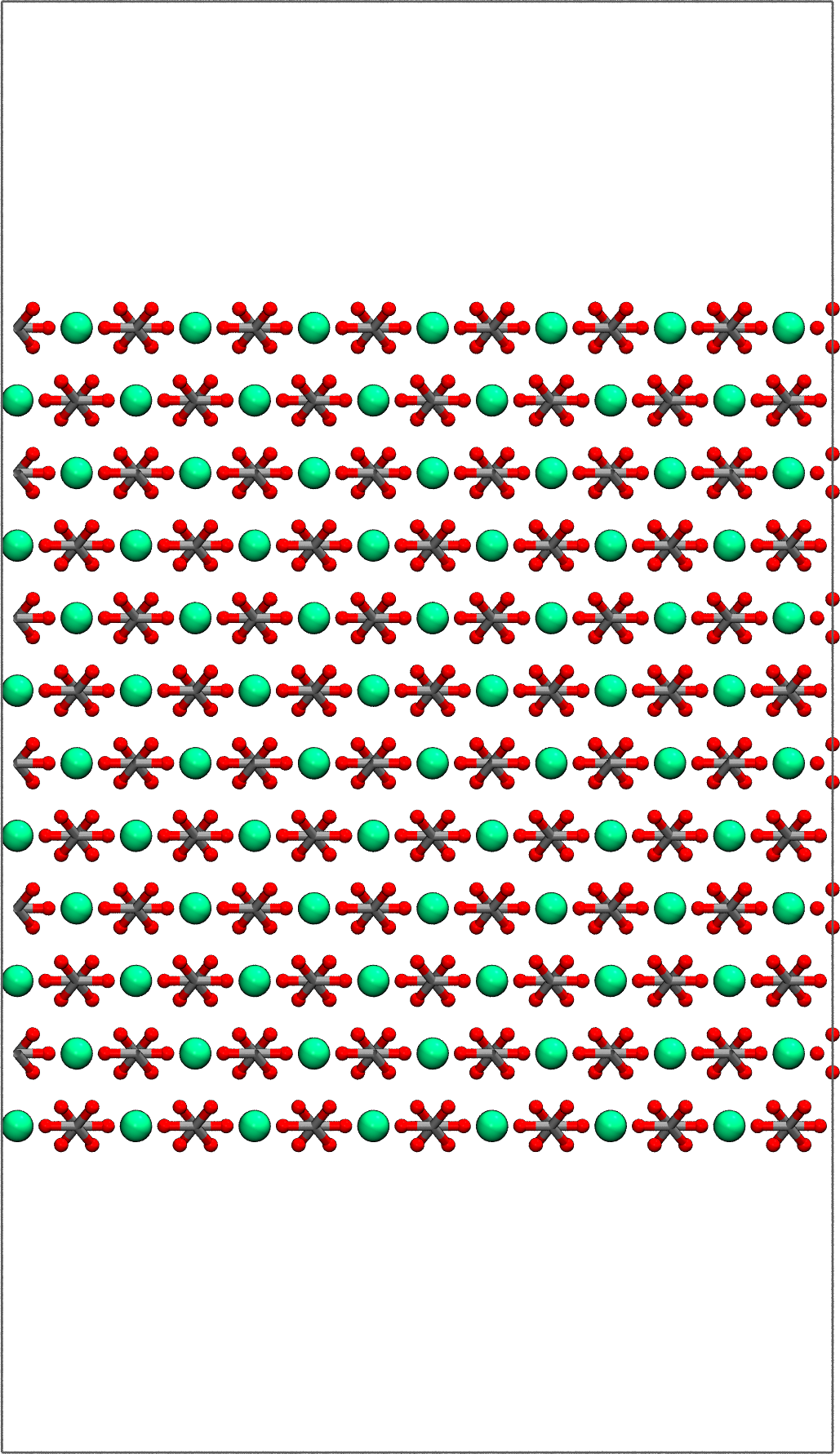
Step 5: Visualize the Surface#
Visualize the generated surface using VMD:
# Visualize the surface
slab.view()

Step 6: Extend the slab and write#
slab.replicate([7,1,1])
slab.view()
slab.write("calcite_104.data")